
LITE COMS SUPPORT
Need Help With Your LITE SAT 1.3?
Get instant answers to setup, troubleshooting, maintenance, manuals, packing lists, and operational questions using our AI Field Support Agent for the LITE SAT 1.3.
BEFORE YOU START
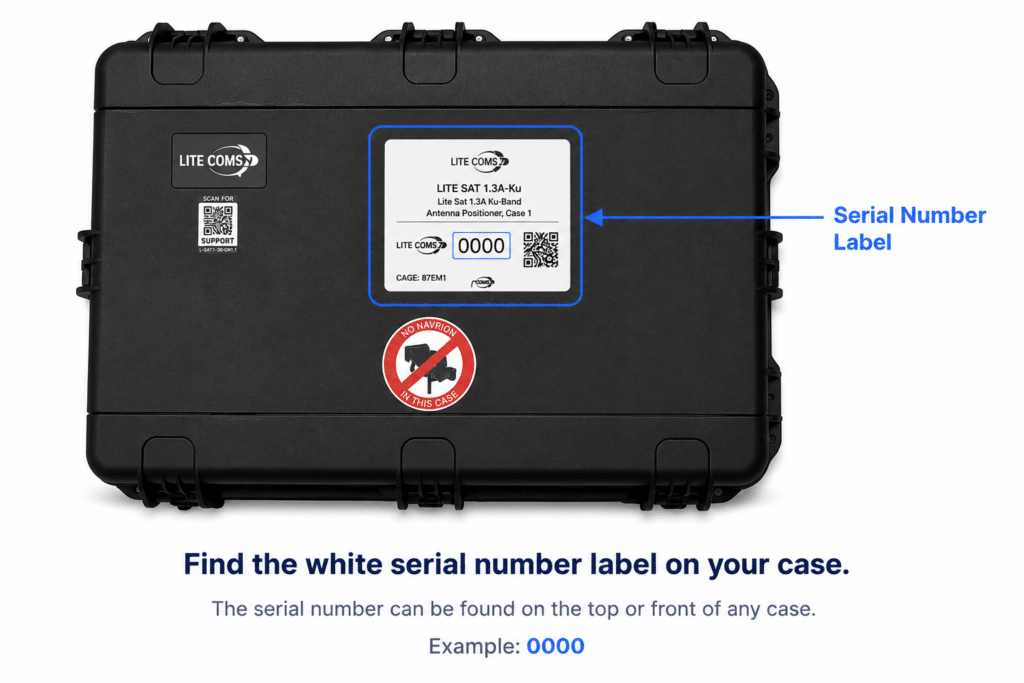
To access the AI Field Support Agent, you’ll need your terminal’s serial number.
Frequently Asked Questions
Find answers to common questions and get the support you need.
Perform routine inspections to ensure the terminal remains operational and mission-ready:
- Check for missing hardware such as screws, nuts, and bolts. Replace as needed.
- Inspect all screws and fasteners for proper condition and tightness.
- Clean exterior surfaces only with a mild, non-abrasive cleaner and soft cloth.
- Inspect reflector surfaces for chips, cracks, or faulty latches and report issues to the depot or inventory team.
- Verify all latches and knobs operate smoothly and show no excessive wear.
- Inspect transport cases and case latches for damage or wear.
- Check all external and interconnect cables for cuts, abrasions, or connector damage.
- Inspect feed assemblies and LRUs for signs of wear or physical damage.
- Inspect all external RF and electrical connectors for damage or corrosion.
The default terminal IP address is: 192.168.100.1
If the Lite Link interface is inaccessible, verify the following:
- Confirm the terminal IP address is correct.
- Check the Ethernet connection between the PC and terminal.
- Verify the connected PC has a valid IP address and subnet mask configuration.
- Ensure the terminal is fully powered and initialized.
If an iDirect OpenAMIP “Not Ready” fault is present or the modem connection status is not connected:
- Confirm the modem option files are configured for OpenAMIP operation.
- Verify the ACU iDirect IP address and port configuration match the modem option file settings.
- Check the Ethernet connection between the modem and terminal.
- Confirm the iDirect OpenAMIP module is properly installed and enabled.
If the distant end is not receiving a signal from the terminal:
- Confirm DC power is present at the BUC/SSPA.
- Verify the coaxial cable connection between the positioner and feed assembly.
- Inspect the BUC/SSPA monitoring and control interface for alarms or faults.
- Confirm no external alarm indicators are active on the SSPA.
- If a reference error is present, verify the 10 MHz reference signal to the BUC/SSPA.
If the receive signal is not detected:
- Verify azimuth and elevation look angles are correct.
- Confirm DC power and 10 MHz reference are present at the LNB coax input.
- For Ka-band LNBs, blinking LEDs may indicate a missing 10 MHz reference.
- Confirm the modem is transmitting properly.
- Verify the correct frequency band is selected on the LNB.
- For iDirect systems, verify the receive frequency configuration in the modem option files.
| Band | Ku | Ka | Ka-WB | X | Appx. 30B |
|---|---|---|---|---|---|
| Transmit (GHz) | 13.75 – 14.5 | 30 – 31 | 29 – 31 | 7.9 – 8.4 | 12.75 – 13.25 |
| Receive (GHz) | 10.7 – 12.75 | 20.2 – 21.2 | 19.2 – 21.2 | 7.25 – 7.75 | 10.7 – 10.95 |
| EIRP (dBW) Nominal | 58.5 | 63 | 62 | 56 | 58 |
| G/T (dB/K) Nominal | 20.5 | 23 | 23 | 17 | 20 |
| Specification | Value |
|---|---|
| AC Power | 90 – 260 VAC |
| Frequency | 47 – 63 Hz |
| Consumption (Worst Case) | ≤ 760W |
Need help with something else?
If you have more questions or need assistance, feel free to reach out to our team. We’re here to help you with any inquiries.